Magzter: Magazines, Newspapers
- 3.8
- Rating
- 1.00M
- Installs
- Free
- Price

 Analysis by App-foxy
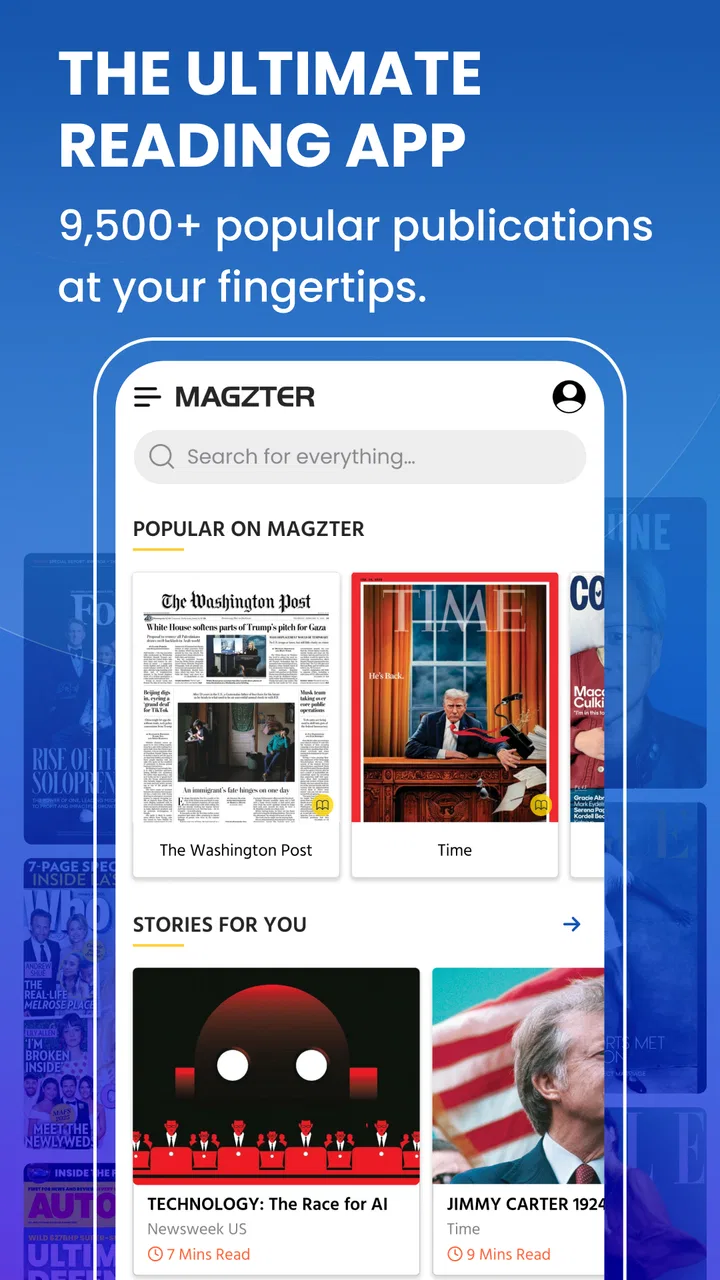
I spent time with Magzter: Magazines, Newspapers as a way to read beyond the narrow selection usually available through a single publication app. It is a free news and magazines app from Magzter Inc., aimed at readers who want newspapers and magazines gathered in one place rather than scattered across many publisher services. Its appeal is obvious: the catalogue reaches across more than forty categories and over sixty languages, so it can serve very different reading habits, from quick news checks to long-form leisure reading.
My overall impression is positive but conditional. The breadth is the main reason to try it, while the amount of content and the way magazine pages behave on a phone are the main reasons some people may find it tiring. I would recommend it to curious readers who enjoy exploring publications from different countries, especially if they are comfortable adjusting their reading routine around a large digital library. I would be more cautious about recommending it to someone who needs consistently simple navigation, very large text, or a completely predictable reading experience.
Reading comfortably in a very large catalogue
I find the catalogue’s breadth most useful when I give browsing a purpose: a subject, a language, or a kind of reading I have time for. That small choice can turn a huge shelf into a manageable one, while still leaving room for an unexpected discovery. The next section looks at how that approach affects the experience of finding and reading a publication.
You May Also Like

 Blood Strike: 2.5 Anniversary
Blood Strike’s Loadouts Turn Every Drop Into a Tactical Gamble
A close look at Blood Strike’s custom loadouts: how fast access to signature weapons reshapes its battle royale rhythm, rewards preparation, and narrows the gap between fights.

 Pandora - Music & Podcasts
Pandora’s Music Is Easy to Start, but Harder to Recover
Pandora’s strength is its low-effort path from a seed to a station. Its weak spot is how much confidence it asks you to place in connection, setup, and quiet recovery.

 8 Ball Pool
 Is Built on Rivalries, Rematches, and Routine
A close look at the rivalries, rematches, shared routines, and unanswered safety questions that turn a quick pool match into a persistent mobile community.

 Samsung Music
’s Quiet Strength Is Playing What You Already Own
Its reach comes less from spectacle than from dependable access to a personal library. That simplicity is both the app’s strongest retention engine and its ceiling.

 AccuWeather: Weather Radar
AccuWeather Review: A Quick, Clear Forecast for Everyday Decisions
For everyday plans, the best forecast is the one you can understand quickly. AccuWeather makes rain timing, radar, and local conditions easy to act on, with a few trade-offs.

 Hill Climb Racing
Why Hill Climb Racing Still Turns Crashes Into One More Run
A tiny car, a bumpy hill and one more upgrade: Hill Climb Racing keeps resurfacing because its simple chaos makes every near-miss feel personal.
More From Our News Desk
View All News


Finding something useful without getting lost
The first challenge is not a shortage of material; it is deciding where to begin. Magzter is positioned as a broad news and magazines service, and that breadth changes the experience compared with a single newspaper app. A publisher app normally guides me toward one editorial identity. Here, I have to make more choices: subject, language, publication style, and whether I want current news or a slower magazine feature.
That can be enjoyable when I am in an exploratory mood. I might begin with a familiar topic and then notice publications from another region or a related subject that I would not have searched for directly. It is also useful for readers who are trying to maintain contact with a language they do not see often in local newsstands. The catalogue’s multilingual focus is not just a headline benefit; it can make the app relevant to families, international students, travelers, and readers who switch between languages.
The trade-off is cognitive load. A person who already knows the exact publication they want will usually have an easier time than someone who opens the app hoping to browse casually. I found it helpful to treat the service like a library rather than a traditional news homepage: decide what kind of reading session I want first, then search or browse with that purpose in mind. Otherwise, the number of choices can turn a short break into an extended hunt for the right issue.
Why the page format matters for readability
Magazine reading is different from reading a normal article in a mobile browser. Pages often depend on columns, photographs, captions, sidebars, and typography designed for a larger sheet of paper. On a phone, I had to balance seeing the whole page against zooming in far enough to read comfortably. The full-page view preserves the publication’s visual design, but small text can become a problem when I am reading without ideal lighting.
For me, the best approach is to read in shorter sections instead of trying to consume an entire issue in one uninterrupted sitting. I also prefer a larger screen when I am settling in for a long feature. A tablet or a phone held close can make the same issue feel very different, even though the content has not changed. This is an important practical point for anyone comparing Magzter with ordinary text-first news apps: the latter are generally easier to scan, while this service is more faithful to the magazine layout.
That fidelity is valuable for recipes, travel spreads, design articles, photography, and publications where the arrangement of the page carries meaning. It is less convenient for readers who want a clean stream of adjustable text. If your priority is effortless resizing and rapid skimming, a publisher’s simplified article view or a dedicated text-based news reader may suit you better.
A realistic morning routine
Imagine a weekday morning when I have ten minutes before leaving home. I can use the app to check a familiar news publication, but I would not plan a deep magazine session in that window. The page-based format rewards attention, and interruptions make it easy to lose the thread of a long article. In that situation, I would choose one short target rather than browse the entire catalogue.
On a quiet evening, the calculation changes. I can select a topic, settle into one issue, and use the service as a digital reading shelf. This is where its range becomes more useful than a collection of separate publisher apps. Instead of remembering several logins and switching between different interfaces, I can keep discovery in one place. The convenience is strongest when variety matters more to me than loyalty to one publication.
Useful habits for a less tiring session
I recommend deciding on a reading goal before opening the catalogue. “I want international news,” “I want a technology magazine,” or “I want something in a particular language” is more effective than tapping through recommendations without a plan. This small habit reduces visual and mental clutter and makes the app feel more manageable.
I would also avoid judging the experience from a single issue. Publications use different layouts, image densities, and writing styles. One may be easy to follow while another feels cramped on a phone. If readability is important to you, sample several kinds of publication before committing to a regular routine. That is a more reliable test than assuming the entire library behaves identically.
Controls, touch use, and different abilities
From a motor perspective, page-based reading can be demanding because it encourages repeated tapping, swiping, and zooming. Readers with limited dexterity may find small controls or precise gestures frustrating, particularly when they are trying to move around a detailed page rather than simply advance through plain text. I found that slower, deliberate gestures worked better than quick swipes, especially when I was already zoomed in.
This is also where device choice matters. A larger display can reduce the need for constant pinching and repositioning. A stable surface can help someone who has difficulty holding a phone for a long period. These are not special modes inside the app; they are practical adjustments that can make the same content less physically demanding.
For readers with visual sensitivities, the mix of photographs, advertisements, contrasting layouts, and dense pages may be tiring. The visual identity of a magazine is part of its appeal, but it can also create a busier environment than a plain news reader. I would approach it in short sessions and avoid using it when glare, movement, or low light makes detailed reading harder.
Readers who rely on assistive technologies should test the specific publications they plan to read rather than assume every page will behave like ordinary app text. A digital magazine can contain text embedded in a designed page, and that may not offer the same flexibility as a clean article layout. I would not treat the broad catalogue as proof that every issue is equally accessible. The inclusive choice is to try a sample, check whether navigation feels workable, and keep another reading source available.
When attention, hearing, or vision is limited
The service is primarily valuable as a visual reading experience. That makes it a natural fit for people who enjoy looking through pages, images, and layouts, but it may be less suitable for someone who needs a fully audio-led way to consume news. I would not choose it as my only source during a commute where I cannot look at the screen, nor would I depend on it when my attention is divided between walking, cooking, or managing another task.
At home, the situation is more favorable. A reader can control the lighting, use a larger device, pause whenever needed, and return to a page without pressure. This flexibility helps people whose energy or concentration changes during the day. A short, focused reading session can be more successful than treating the app like a continuous news feed.
Language choice is another inclusive strength. Access to publications in many languages can help bilingual households and readers who are more comfortable with a language other than the one used by local media. It can also support gradual language practice, although I would choose material carefully: a dense current-affairs magazine may be much harder than a familiar lifestyle publication.
Using it while traveling or away from a routine
Magzter makes the most sense for me when my normal reading environment changes. During travel, a single catalogue can be more convenient than carrying several printed issues or installing numerous publisher apps. It can also offer a sense of familiarity to someone living away from home who wants publications connected to another country or language.
There is a practical limitation, though: digital reading still depends on a charged device, a comfortable screen, and a usable connection for discovering or loading material. I would prepare my reading choices before a flight, a long appointment, or a place with unreliable service rather than assume that browsing will always be effortless at the moment I need it. That preparation is especially worthwhile for readers who use the app as a replacement for physical magazines.
Subscription decisions and the cost of exploring
The app itself is free to install, but it includes purchases ranging from forty-nine cents to three hundred ninety-nine dollars and ninety-nine cents per item. That wide range is a reminder to slow down before confirming anything. A reader who opens the app mainly to browse should distinguish between previewing a publication and obtaining access to its full content.
I would personally begin with the free parts of the experience, identify the publications I genuinely return to, and only then consider paying. This avoids the common mistake of buying access because a cover looks appealing and discovering that the reading format does not suit the device or eyesight. It also gives me time to decide whether I prefer a broad catalogue or a direct subscription to one favorite publisher.
Compared with buying individual print magazines, a digital catalogue can be more convenient and less physically cluttered. Compared with a single publisher subscription, it may offer more variety but less of the focused relationship that comes with one publication’s own app. The right value depends on how widely I read. Someone who follows one newspaper closely may find a direct subscription clearer, while someone who samples many categories may get more from Magzter’s library model.
What I would like users to check before relying on it
My biggest reservation is consistency. A service that gathers publications from many sources cannot make every issue feel identical. Navigation, page density, editorial design, and reading comfort can vary from one title to another. That does not make the app poor, but it means I would not promise the same experience to every reader.
I would also keep expectations realistic about discovery. A large catalogue does not automatically mean that the perfect publication will appear immediately. Search terms, language preferences, and the willingness to browse related categories all affect the result. Readers who dislike exploring or who want one uncluttered feed may feel that the app asks them to do too much choosing.
Another barrier is physical comfort. Long sessions on a small phone can lead to repeated zooming and awkward hand positions. I found the app more enjoyable when I treated it as a collection of reading appointments instead of an endless scroll. That shift is a concrete improvement: choose one issue, read a defined section, take a break, and return later rather than forcing the whole publication into one sitting.
How the app compares with familiar alternatives
A normal news website is usually faster for headlines, links, and quick updates. A newspaper’s own app may provide a more focused flow and may be easier for readers who only care about one editorial source. Printed magazines remain appealing for people who want tactile pages, no battery concerns, and a fixed visual scale.
Magzter sits between those options. It is broader than a single publisher app and more visually faithful to magazine reading than a plain news feed. That middle position is its strongest argument and its central compromise. I gain discovery and variety, but I may give up some simplicity and consistency. I gain portability, but I still need to manage screen comfort and device limitations.
The app has a 3.8 average from around 41 thousand ratings, with over 1 million installs, which suggests a substantial audience but also a mixed experience rather than universal approval. I would read that as a reason to match the app to my habits instead of treating popularity as a guarantee. The current version is 8.74.0 and it requires Android 6.0 or later, so device compatibility is worth checking before planning a regular reading setup.
Who should try it, and who should skip it
I think it is a strong candidate for readers who enjoy magazines as designed objects, want publications in multiple languages, or regularly move between unrelated subjects. It is also appealing to families or households where different people want different kinds of reading without maintaining a separate app for every publication.
I would be more hesitant for someone who needs large, continuously adjustable text, wants a distraction-free headline feed, or depends on one-handed use for long periods. It may also be the wrong choice for a reader who follows one newspaper exclusively and would rather have that publisher’s most direct and focused experience. In those cases, a dedicated news app or a simpler text reader could be more comfortable.
My inclusive verdict
After using it as both a discovery tool and a reading shelf, I see Magzter as a flexible service whose inclusiveness comes mainly from choice: many subjects, many languages, and the ability to bring different publications into one digital space. That choice can support readers with varied interests and backgrounds, but it also creates a busier experience than a single-purpose news app.
The best way to use it is to match the reading format to the person and the moment. Use a larger screen for detailed pages, choose short sessions when concentration or vision is limited, prepare material before travel, and test individual publications rather than assuming the whole catalogue offers the same level of comfort. Those steps do not remove every barrier, but they make the service more practical.
Magzter Inc. has built something I would recommend to the curious, variety-seeking reader who is willing to explore and adjust. I would not call it the simplest option, and I would not make it the only reading source for someone with demanding accessibility needs. Still, as a free entry point into a broad digital magazine and newspaper collection, it offers enough range to earn a place on the phone of the right reader. Its Teen content rating is another reminder to choose publications thoughtfully, particularly when the app is shared with younger members of a household.
FAQs for Magzter: Magazines, Newspapers
01What is Magzter: Magazines, Newspapers?
Magzter is a digital reading app that provides access to a large collection of magazines and newspapers from different countries and categories. After installing it, users can browse publications covering topics such as technology, fashion, business, sports, lifestyle, entertainment, and current affairs. Content availability may vary by region, language, and subscription plan.
02Is Magzter free to download and use?
Magzter can generally be downloaded for free, but access to most premium magazines and newspapers usually requires a subscription or individual purchase. The app may offer selected free articles, previews, or promotional access so users can explore the catalog before paying. Check the current pricing, trial conditions, renewal terms, and available payment options in your app store.
03What does a Magzter subscription include?
A Magzter subscription typically provides access to a broad selection of digital magazines and newspapers for the duration of the plan. Depending on the current offer, subscribers may be able to read issues online or download them for offline use. The exact catalog, premium titles, features, and subscription benefits can change over time and differ between countries.
04Can I read Magzter magazines and newspapers offline?
Many publications available through Magzter can be downloaded for offline reading, which is useful when traveling or when an internet connection is unreliable. You normally need to open the selected issue while connected and download it to the app first. Offline access may depend on the publication, available storage, subscription status, and app settings.
05Is Magzter available on both Android and iOS?
Magzter is designed for mobile users and is generally available on both Android and iOS devices through their respective official app stores. Before downloading, make sure your phone or tablet meets the app’s operating-system requirements and has enough storage for downloaded issues. Features and subscription prices may differ slightly between platforms or regions.
Pros
- Large catalog of magazines and newspapers from around the world.
- Supports offline reading after downloading selected issues.
- Personalized recommendations make discovering titles easier.
- Includes back issues for many publications
- not just the latest editions.
- Reading settings offer adjustable text size and comfortable viewing options.
Cons
- Full access requires a recurring subscription or separate purchases.
- Some publications may have limited issues or regional availability.
- Downloaded content can use considerable storage space on your device.
- The app may feel overwhelming because of its extensive catalog.
- Certain digital editions may not match the layout of printed versions.

Magzter: Magazines, Newspapers
Gallery